Deploy XMPro on AWS Kubernetes (EKS)
Introduction
Get XMPro running on Amazon Elastic Kubernetes Service (EKS) with Terraform automation. This is the Kubernetes-native AWS deployment for the 5.0 platform.
Deployment uses a multi-layer model designed for shared clusters: one EKS cluster (with its platform controllers) can host multiple isolated XMPro sites, each with its own databases, KMS key, DNS subzone, and Helm release. The two optional layers are Stream Hosts for a site, and the backing services for the AI product's RAG features.
| Layer | Applied | Contains |
|---|---|---|
1 - Cluster (infra-k8s) |
Once per cluster | VPC, EKS cluster, AWS Load Balancer Controller, Envoy Gateway, cert-manager, External Secrets Operator, GatewayClass, pre-allocated gateway NLB EIPs |
2 - Site infrastructure (infra) |
Once per site | RDS SQL Server + databases, KMS key, Route53 subzone + wildcard A record |
3 - Site application (app) |
Once per site | Per-site secret store (AWS Secrets Manager → Kubernetes), per-site Gateway + Let's Encrypt Issuer, XMPro Helm release, HTTPRoutes |
4 (optional) - Stream Hosts (stream-hosts) |
Per site, as needed | One standalone Stream Host per Collection |
5 (optional) - AI backing services (infra-ai) |
Once per cluster (shared by all sites) | Dedicated node group, RAG namespace, Milvus, Neo4j, TimescaleDB, Mosquitto, per-stack secret bundle + S3 bucket |
Note
This guide works on Windows, Mac, and Linux. Windows users should use Command Prompt or PowerShell. The deployment requires terraform, aws, and kubectl on PATH.
Provision Infrastructure Your Own Way?
Note
Infrastructure provisioning is your responsibility. The infrastructure layers (infra-k8s, infra, infra-ai) are templates: they show how XMPro provisions these resources internally, and you can use them as-is, adapt them, or replace them entirely with your own provisioning. Only the application layer (app) is the deployment interface the platform requires; it consumes whatever infrastructure you point it at. The Terraform module in this guide is provided as an example only and is not officially supported by XMPro: you are responsible for infrastructure configuration, maintenance, and support. See the Deployment Responsibility Matrix for details.
Tip
The example module uses m6i.large nodes and a db.t3.small SQL Server Express RDS instance by default, suitable for development and evaluation. t-class instances (t3.medium, t3.large) are for test, development, or evaluation only, not production. SQL Server Express has a 10 GB per-database cap; use sqlserver-se or higher for production. See the Sizing Guideline for production sizing.
You can provision the required infrastructure using:
- The example Terraform module (community-supported)
- The AWS Management Console (ClickOps)
- Your organization's infrastructure-as-code tools
The table below lists the resources the template layers (infra-k8s, infra, infra-ai) provision. Provision them yourself any way you like, the application layer (app) only consumes them.
| Scope | Component | Requirement |
|---|---|---|
| Cluster-level | VPC | Private and public subnets across at least 2 AZs, NAT gateway, internet gateway |
| Cluster-level | EKS cluster | Kubernetes 1.30+ with managed node groups (system + app pools), OIDC provider enabled |
| Cluster-level | AWS Load Balancer Controller | Installed cluster-wide; provisions the NLB in front of the gateway |
| Cluster-level | Envoy Gateway controller | Installed cluster-wide, with a GatewayClass (eg) |
| Cluster-level | cert-manager | Installed cluster-wide |
| Cluster-level | Istio (base + istiod + Istio CNI) | Installed cluster-wide, or deploy the application layer from environments/site-template/app, which declares enable_istio and lets you set it false. On a self-built cluster the node security group must allow TCP 15017 from the cluster security group (istiod's sidecar-injection webhook) |
| Cluster-level | External Secrets Operator | Installed cluster-wide, with an IAM role (IRSA) that can read every site's xmpro/<name_suffix>/secrets bundle in AWS Secrets Manager |
| Cluster-level | Pre-allocated Elastic IPs | One per public-subnet AZ, adopted by the gateway NLB |
| Per site | RDS SQL Server | With 3-4 databases (SM, AD, DS, and optionally AI) |
| Per site | KMS key | Customer-managed key the application layer uses to encrypt its Secrets Manager bundle |
| Per site | IRSA role for XMPro pods | IAM Role for Service Accounts, trust policy bound to system:serviceaccount:<site>:xmpro |
| Per site | Container registry pull secret | Created by the application layer from your GHE credentials; see Registry authentication |
| Per site | Route53 hosted zone (or external DNS) | With a wildcard A record pointing at the gateway EIPs |
| Optional (AI RAG only) | AI backing services | Vector store (Milvus), graph database (Neo4j), time-series database (TimescaleDB), and MQTT broker (Mosquitto), all reachable from the cluster |
| Optional (AI RAG only) | AI services provisioning | The optional layer 5 template (infra-ai, examples/layered/infra-ai) provisions all of these on a dedicated node group, applied once per cluster and shared across its sites |
| Optional (AI RAG only) | AI app-layer inputs | When enable_ai_rag = true, the application layer requires the TimescaleDB and Neo4j connection strings (its AI database-migration Job runs their schema migrations); the other services are consumed in-cluster, not via application-layer inputs |
Once you've created these resources, you still need Steps 1-4 (install the CLI tools, sign in to AWS, confirm your registry credential, and clone the module for its app layer), then skip ahead to Step 8: Deploy the Site Application Layer and provide the details in your configuration.
Architecture
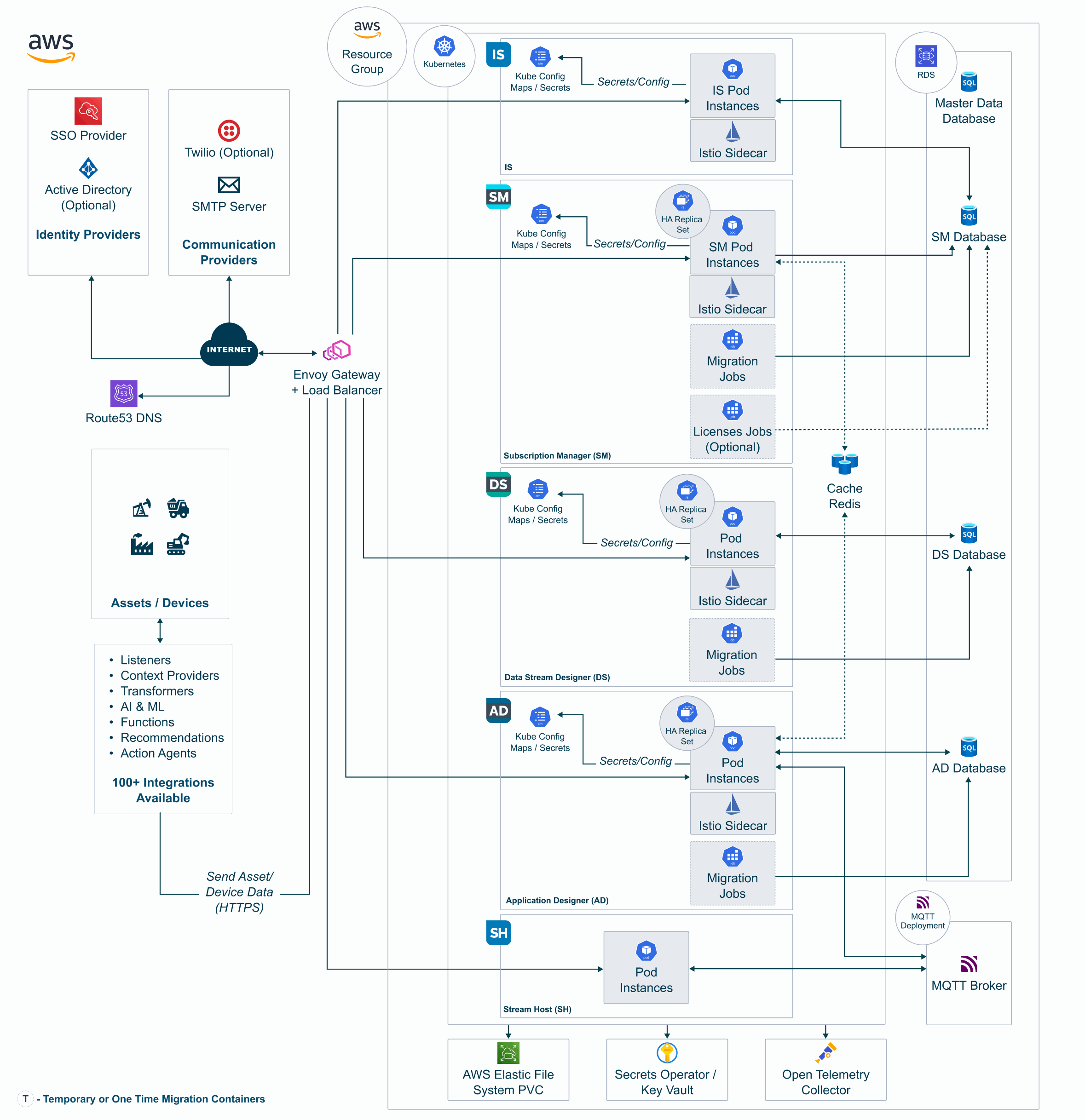
The Terraform layers that build this:
┌─────────────────────────────────────────────────────────────────┐
│  Layer 1 - Cluster (examples/layered/infra-k8s)                 │
│  Apply ONCE per cluster                                         │
│  - VPC, subnets, NAT gateway, IGW                               │
│  - EKS cluster + system / app managed node groups, OIDC         │
│  - AWS Load Balancer Controller (cluster-wide)                  │
│  - Envoy Gateway, cert-manager, External Secrets (cluster-wide) │
│  - GatewayClass "eg" + pre-allocated gateway NLB EIPs           │
└─────────────────────────────────────────────────────────────────┘
                              │
                              ▼  per site
┌────────────────────────────────────────────────────────────────┐
│  Layer 2 - Site infrastructure (examples/layered/infra)        │
│  Apply once PER SITE                                           │
│  - RDS SQL Server + SM / AD / DS (/ AI) databases              │
│  - KMS key (per-site secret bundle)                            │
│  - Route53 subzone + wildcard A record → gateway EIPs          │
└────────────────────────────────────────────────────────────────┘
                              │
                              ▼  per site
┌────────────────────────────────────────────────────────────────┐
│  Layer 3 - Site application (examples/layered/app)             │
│  Apply once PER SITE                                           │
│  - Per-site secret store (AWS Secrets Manager → K8s)           │
│  - Per-site Gateway + Let's Encrypt Issuer                     │
│  - XMPro Helm release: SM, IS, AD, DS, optional AI,            │
│    dbmigrate + licenses Jobs                                   │
│  - Gateway API HTTPRoutes per product                          │
└────────────────────────────────────────────────────────────────┘
                              │
                              ▼  per site, as needed
┌────────────────────────────────────────────────────────────────┐
│  Layer 4 (optional) - Stream Hosts (layered/stream-hosts)      │
│  - One standalone Stream Host Helm release per Collection      │
└────────────────────────────────────────────────────────────────┘

┌────────────────────────────────────────────────────────────────┐
│  Layer 5 (optional) - AI backing services                      │
│  (examples/layered/infra-ai)                                   │
│  Apply ONCE per cluster (shared by all sites)                  │
│  - Dedicated AI node group                                     │
│  - RAG namespace                                               │
│  - Milvus, Neo4j, TimescaleDB, Mosquitto                       │
│  - Per-stack Secrets Manager bundle + S3 uploads bucket        │
└────────────────────────────────────────────────────────────────┘
Traffic flow: https://{ad,ds,sm,ai}.<site-zone> → NLB (static EIPs) → Envoy Gateway → HTTPRoute → product Service. The sm. hostname is path-split: /identity/* routes to the Identity Server (IS); everything else routes to Subscription Manager (SM).
Cluster-Level Components
Layer 1 installs a fixed set of platform components into the cluster, once per cluster. Every site's application layer assumes they are already present: layer 3 creates only per-site resources - the secret store, Gateway, Issuer, HTTPRoutes and Helm release - and binds them to these shared components. Adding a site never installs or upgrades any of them.
| Component | Namespace | Purpose |
|---|---|---|
| AWS Load Balancer Controller | kube-system |
Provisions and manages the NLB fronting the gateway |
| Envoy Gateway | envoy-gateway-system |
Gateway API data plane; provides the GatewayClass the sites' Gateway resources bind to |
| cert-manager | cert-manager |
Issues Let's Encrypt certificates for product hostnames via HTTP-01 |
| External Secrets Operator | external-secrets |
Syncs AWS Secrets Manager bundles into Kubernetes Secrets the chart consumes |
| istio-base | istio-system |
Istio CRDs |
| istiod | istio-system |
Istio control plane and sidecar injection |
| istio-cni | kube-system |
Istio CNI plugin; enables unprivileged sidecars so Pod Security baseline can be enforced |
If you build the cluster yourself instead of applying layer 1, these are the components you install. Provision Infrastructure Your Own Way? lists them alongside the rest of the infrastructure the application layer expects.
To confirm what an existing cluster already has:
All platforms:
helm list -A
Note
Istio CNI and Pod Security. Because layer 1 installs Istio CNI, injected pods use the unprivileged istio-validation init container rather than the classic sidecar init container (which needs NET_ADMIN and root). Pod Security baseline admits that container, so the application layer's pod_security_enforce defaults to baseline and enforcement is active on each site namespace. The Azure Kubernetes deployment does not install Istio CNI and defaults pod_security_enforce to "", leaving enforcement disabled.
Prerequisites
You need:
- An AWS account with permissions to create the resources in the layers you apply (VPC, EKS, EC2, RDS, IAM, KMS, Secrets Manager, Route53, CloudWatch; ElastiCache if you enable autoscale), and with service quotas that leave room for them
- A computer with internet access
- Read access to the repository XMPro delivered the deployment files to
- Credentials for the container registry named in your delivery package (
{{ACR_URL}}in this guide)
For how the deployment assets (Terraform modules, container images, and security artifacts) are delivered to your organisation, see Getting the deployment assets in the Installation Overview. The repository URL and container registry credentials used in this guide are confirmed as part of your delivery package.
Quick Deployment
1. Install Required Tools
Install these on your computer:
- Git: Download here
- Terraform: Download here (>= 1.7)
- AWS CLI: Download here (v2)
- kubectl: Download here (1.30+)
Verify they work:
All platforms:
git --version
terraform version
aws --version
kubectl version --client
2. Login to AWS
All platforms:
aws configure              # Long-lived access keys
# OR
aws sso login              # AWS IAM Identity Center / SSO

# Verify
aws sts get-caller-identity
Tip
Terraform automatically uses your AWS CLI credentials. For CI/CD pipelines, prefer OIDC federation over long-lived keys.
3. Registry Authentication
XMPro's container images live in {{ACR_URL}} and are not anonymously pullable. Confirm your credential works now — this fails in seconds, where a bad or expired token otherwise surfaces as ImagePullBackOff fifteen minutes into an apply.
All platforms:
read -rs GHE_PAT            # prompts, so the token never lands in shell history
printf '%s' "$GHE_PAT" | docker login containers.xmpro.ghe.com -u YOUR-GHE-USERNAME --password-stdin
docker manifest inspect {{ACR_URL}}/ad:{{VERSION}}
Both commands must succeed before you continue.
Important
That login authenticates you, not the cluster. Terraform does not pull images — the cluster nodes do, using a pull secret inside the namespace. You supply the credentials once, in the application layer (step 8), and it creates that secret for you. Logging in locally and skipping the Terraform variables leaves every pod in ImagePullBackOff.
Pull secrets are namespaced, so one is created per site rather than per cluster. Either set registry_username and registry_password in the application layer and let it create the secret, or create the secret yourself and name it in image_pull_secrets so the credentials never touch Terraform state. If you mirror the images into your own ECR, leave all three empty — the node IAM role handles the pull and no secret is created.
To create the secret yourself, the namespace has to exist first. It is the site's name_suffix, and the application layer creates it — so either run this after the first application-layer apply, or create the namespace up front with kubectl create namespace <name_suffix> and the application layer will adopt it.
export GHE_USERNAME=your-ghe-username
read -rs GHE_PAT            # prompts, so the token never lands in shell history

tmp="$(mktemp -d)"; trap 'rm -rf "$tmp"' EXIT
printf '%s' "$GHE_PAT" | DOCKER_CONFIG="$tmp" docker login containers.xmpro.ghe.com \
  -u "$GHE_USERNAME" --password-stdin
kubectl create secret generic xmpro-registry \
  --from-file=.dockerconfigjson="$tmp/config.json" \
  --type=kubernetes.io/dockerconfigjson \
  -n <name_suffix>
Then set image_pull_secrets = ["xmpro-registry"] in the application layer and leave registry_username and registry_password empty.
4. Get the Deployment Files
Use the deployment repository URL from your delivery package as <deployment-repository-url> below.
Windows (PowerShell):
git clone <deployment-repository-url> terraform-k8s
cd terraform-k8s\terraform-xmpro-eks\examples\layered\infra-k8s
Copy-Item terraform.tfvars.example terraform.tfvars
Windows (Command Prompt):
git clone <deployment-repository-url> terraform-k8s
cd terraform-k8s\terraform-xmpro-eks\examples\layered\infra-k8s
copy terraform.tfvars.example terraform.tfvars
Mac/Linux:
git clone <deployment-repository-url> terraform-k8s
cd terraform-k8s/terraform-xmpro-eks/examples/layered/infra-k8s
cp terraform.tfvars.example terraform.tfvars
At minimum, edit these values in terraform.tfvars:
company_name = "yourco"          # Drives resource and database naming
name_suffix  = "dev"             # Cluster identifier
aws_region   = "us-west-2"       # Your target region

kubernetes_version = "1.34"
vpc_cidr           = "10.40.0.0/16"
single_nat_gateway = true        # One NAT gateway (cheaper); false = one per AZ

system_node_instance_type = "m6i.large"   # t3-class is fine for test/dev/evaluation, not production
app_node_instance_type    = "m6i.large"
app_node_count            = 1    # see the sizing guide before the first apply
Important
Size the application node group before this first apply. The install peak (products plus the database-migration and licensing Jobs, each with an Istio sidecar) is well above the steady state. See the Sizing Guideline for how to choose the instance type and count, and how to resize an existing group.
Warning
Do not use xmpro as company_name. It collides with a hardcoded XMPro company in the SM database migration scripts (case-insensitive unique constraint).
5. Deploy Layer 1 - Cluster
The cluster layer configures Kubernetes/Helm providers from the EKS cluster it creates, so a first (greenfield) apply must be done in two phases: create the VPC and cluster first, then apply the rest (the platform controllers, which need a reachable cluster):
All platforms:
terraform init

# Phase 1 - VPC + EKS cluster (so the k8s/helm providers can connect)
terraform apply -target=module.cluster.module.vpc -target=module.cluster.module.eks_cluster

# Phase 2 - platform controllers, GatewayClass, gateway EIPs
terraform apply
Important
Phase 1 must target module.cluster.module.vpc as well as the cluster. Targeting only the cluster prunes the NAT gateways/public subnets from the plan: nodes then come up with no egress to ECR, can't pull the CNI image, and fail to join (NodeGroup CREATE_FAILED: "Instances failed to join the kubernetes cluster"). The two-phase apply is only needed once; subsequent applies against the existing cluster are single-phase.
This creates the VPC, EKS cluster, AWS Load Balancer Controller, Envoy Gateway, cert-manager, External Secrets Operator, Istio (base + istiod + Istio CNI, with the shared gateway joined to the mesh), the GatewayClass, and the pre-allocated gateway EIPs. Takes about 15-20 minutes. You do this once per cluster, additional sites reuse it. See Cluster-Level Components for what each of these controllers does and the namespace it lands in.
Point kubectl at the new cluster. Run terraform output and copy the values into the command (later steps reuse them):
All platforms:
terraform output
Sample output (values are examples, use your own):
cluster_name                  = "eks-yourco-dev"
eks_cluster_oidc_provider_arn = "arn:aws:iam::<account>:oidc-provider/oidc.eks.us-west-2.amazonaws.com/id/<id>"
eks_cluster_oidc_provider_url = "https://oidc.eks.us-west-2.amazonaws.com/id/<id>"
gateway_class_name            = "eg"
gateway_eip_public_ips        = ["52.34.116.201"]
irsa_xmpro_role_arn           = "arn:aws:iam::<account>:role/irsa-xmpro-yourco-dev"
node_security_group_id        = "sg-xxxxx"
private_subnet_ids            = ["subnet-aaa", "subnet-bbb", "subnet-ccc"]
public_subnet_ids             = ["subnet-ddd", "subnet-eee", "subnet-fff"]
vpc_id                        = "vpc-xxxxx"
Then point kubectl at the cluster using the cluster_name value:
All platforms:
aws eks update-kubeconfig --name eks-yourco-dev --region us-west-2
Mac/Linux (substitute straight from Terraform instead of copy/paste):
aws eks update-kubeconfig --name "$(terraform output -raw cluster_name)" --region us-west-2
6. Deploy Layer 2 - Site Infrastructure
Windows (PowerShell):
cd ..\infra
Copy-Item terraform.tfvars.example terraform.tfvars
Windows (Command Prompt):
cd ..\infra
copy terraform.tfvars.example terraform.tfvars
Mac/Linux:
cd ../infra
cp terraform.tfvars.example terraform.tfvars
Edit terraform.tfvars with the values from layer 1 (terraform.tfvars is gitignored, so the credentials you fill in stay local):
company_name = "yourco"
name_suffix  = "site1"           # Unique per site on this cluster
aws_region   = "us-west-2"

# Reuse the cluster VPC (from layer 1 outputs) - no new VPC
create_vpc             = false
vpc_id                 = "vpc-xxxxx"
private_subnet_ids     = ["subnet-aaa", "subnet-bbb", "subnet-ccc"]
public_subnet_ids      = ["subnet-ddd", "subnet-eee", "subnet-fff"]
node_security_group_id = "sg-xxxxx"

# --- Database ---
db_admin_username  = "xmadmin"
db_admin_password  = "ChangeMe123!Strong"   # see RDS password rules below
db_engine          = "sqlserver-ex"          # sqlserver-se/-ee for production
db_engine_version  = "15.00"
db_instance_class  = "db.t3.small"

# --- Redis ---
# ElastiCache Redis backs enable_autoscale in the application layer (Redis
# backplane for multi-replica products). Leave false when running single replicas.
create_redis_cache = false

# --- DNS ---
enable_custom_domain = true
dns_zone_name        = "site1.xmpro.yourco.com"
# Wildcard A record (*.site1...) → gateway NLB EIPs (layer 1 gateway_eip_public_ips)
cluster_gateway_eip_public_ips = ["52.x.x.x", "13.x.x.x"]
Important
RDS password rules. RDS rejects the master password if it contains /, @, ", or a space: the apply fails with InvalidParameterValue: MasterUserPassword is not a valid password. Use 8+ printable ASCII characters mixing upper/lower/digit and a symbol from the allowed set (e.g. ! # $ % ^ & * - _). Set the same value in the application layer's db_admin_password (Step 8).
Apply:
terraform init
terraform plan    # Validates config; most input mistakes fail here, not mid-apply
terraform apply
Tip
Always run terraform plan first. It validates the configuration and reads existing state without creating anything, so most input mistakes - a typo in an id, a missing required variable - cost you seconds instead of a failed apply you have to unpick. It does not perform service-side validation: a value the cloud rejects (such as an RDS password with a disallowed character) still plans cleanly and fails during terraform apply.
This creates the site's RDS SQL Server (with the SM, AD, and DS databases), KMS key, and Route53 subzone with the wildcard A record. Takes about 10-15 minutes, RDS is the long pole.
Verify before continuing
Collect the values Step 8 needs. Two of them are marked sensitive, so plain terraform output prints <sensitive> instead of the value - use -raw for those:
All platforms:
terraform output

terraform output -raw rds_endpoint
terraform output -raw route53_zone_id
terraform output -raw secrets_kms_key_arn
Sample output (values are examples, use your own):
ad_database_name = "XMPro_AD_yourco"
db_admin_password = <sensitive>
dns_zone_name = "site1.xmpro.yourco.com"
ds_database_name = "XMPro_DS_yourco"
rds_endpoint = "rds-yourco-site1.cf0px0jf6636.us-west-2.rds.amazonaws.com"
rds_port = 1433
route53_zone_id = "Z0567878QMDCMEUPLHCC"
secrets_kms_key_arn = <sensitive>
sm_database_name = "XMPro_SM_yourco"
Tip
Keep this output open. Every value in it is copied into the application layer's terraform.tfvars in Step 8.
7. Point DNS at the Gateway
Before deploying the application layer, the product hostnames (ad., ds., sm., and ai. if enabled, under your dns_zone_name) must resolve publicly to the gateway EIPs from layer 1. cert-manager's Let's Encrypt HTTP-01 challenge fails otherwise, and without a certificate the SM and IS products never start. Pick one of the two options below.
Warning
Both options keep enable_custom_domain = true in the application layer (as set in Step 8): that is what creates the per-product HTTPRoutes and the Let's Encrypt certificate. Setting it false in the application layer creates no HTTPRoutes and no TLS at all; the products are then reachable only via kubectl port-forward to their Services, so use it for smoke tests only.
Option A - Point A records at the gateway (simplest)
Use this when your DNS is hosted anywhere with an A-record editor (Route53, Azure DNS, GoDaddy, Cloudflare, your corporate DNS), or when you want the fewest moving parts. Set enable_custom_domain = false in the layer 2 terraform.tfvars so no Route53 subzone or wildcard record is created, then create an A record for each product hostname in the DNS provider you already use, all pointing at the gateway EIPs from layer 1 (terraform output gateway_eip_public_ips):
ad.site1.xmpro.yourco.com   A   52.x.x.x
ds.site1.xmpro.yourco.com   A   52.x.x.x
sm.site1.xmpro.yourco.com   A   52.x.x.x
ai.site1.xmpro.yourco.com   A   52.x.x.x   (only if enable_ai = true)
A single wildcard record (*.site1.xmpro.yourco.com → the gateway EIPs) works too.
route53_zone_id is only meaningful when the zone lives in Route53. If your DNS is hosted elsewhere, leave it empty (or omit it) in Step 8; if the zone is in Route53 and you created the A records there, pass that zone id. Then skip to Verify before continuing.
Option B - Delegate a Route53 subzone (if you own the parent zone in Route53)
If you set enable_custom_domain = true in layer 2 (as shown in Step 6), that apply created the site1.xmpro.yourco.com subzone with a wildcard A record at the gateway EIPs. Its parent zone must delegate to it.
Tip
If the parent zone is a Route53 zone in the same account, layer 2 can create the delegation for you, no manual steps: set manage_parent_dns_delegation = true and parent_dns_zone_name in the layer-2 terraform.tfvars (see its terraform.tfvars.example) and apply. The manual steps below are only needed when the parent zone lives elsewhere.
To delegate manually, get the subzone's nameservers:
terraform output route53_name_servers
Add an NS record in the parent zone for the subzone pointing at the four nameservers shown.
Using Route53 for the parent zone:
aws route53 change-resource-record-sets --hosted-zone-id <PARENT_ZONE_ID> --change-batch '{
  "Changes": [{
    "Action": "UPSERT",
    "ResourceRecordSet": {
      "Name": "site1.xmpro.yourco.com", "Type": "NS", "TTL": 300,
      "ResourceRecords": [{"Value": "ns-1.awsdns-00.org"}, {"Value": "ns-2.awsdns-00.com"}, {"Value": "ns-3.awsdns-00.co.uk"}, {"Value": "ns-4.awsdns-00.net"}]
    }
  }]
}'
Using an external provider for the parent zone (GoDaddy, Cloudflare, etc.): create the same NS records for the subzone in your provider's console.
Important
Wait for the delegation to propagate before applying the app layer. A freshly-delegated zone can take a few minutes to resolve from all of Let's Encrypt's validation vantage points: applying too early can make the first certificate order fail a challenge, after which cert-manager backs off (up to ~1 hour) before retrying. Recovery is to kubectl delete certificate xmpro-le-tls -n <name_suffix> and re-apply.
Verify before continuing
Whichever option you used, confirm every enabled hostname resolves to the gateway EIPs before applying the application layer. Option A creates one A record per product, so checking only ad will miss a record you forgot and the omission surfaces later as a failed certificate order. Check ad, ds and sm, plus ai when enable_ai = true:
Windows (PowerShell):
"ad","ds","sm","ai" | ForEach-Object { Resolve-DnsName "$_.site1.xmpro.yourco.com" -Type A }
Mac/Linux:
for h in ad ds sm ai; do echo -n "$h: "; dig +short $h.site1.xmpro.yourco.com; done
Sample output (your gateway IP will differ):
ad: 52.34.116.201
ds: 52.34.116.201
sm: 52.34.116.201
ai: 52.34.116.201
Drop ai from the list when enable_ai = false. If any hostname returns nothing, or returns anything other than your gateway EIPs, stop here. Applying the application layer now will fail certificate issuance and put cert-manager into a back-off that takes up to an hour to clear.
8. Deploy the Site Application Layer
Windows (PowerShell):
cd ..\app
Copy-Item terraform.tfvars.example terraform.tfvars
Windows (Command Prompt):
cd ..\app
copy terraform.tfvars.example terraform.tfvars
Mac/Linux:
cd ../app
cp terraform.tfvars.example terraform.tfvars
Edit terraform.tfvars with values from layers 1 and 2 (terraform.tfvars is gitignored, so the credentials you fill in stay local):
aws_region   = "us-west-2"
company_name = "yourco"
name_suffix  = "site1"

# [from layer 1]
cluster_name          = "eks-yourco-dev"
irsa_xmpro_role_arn       = "arn:aws:iam::<account>:role/irsa-xmpro-yourco-site1"
cluster_oidc_provider_arn = "arn:aws:iam::<account>:oidc-provider/oidc.eks.us-west-2.amazonaws.com/id/<id>"
cluster_oidc_provider_url = "https://oidc.eks.us-west-2.amazonaws.com/id/<id>"
gateway_class_name        = "eg"     # [from layer 1] gateway_class_name

# [from layer 2]
rds_endpoint        = "rds-yourco-site1.<id>.us-west-2.rds.amazonaws.com"
rds_port            = 1433
ad_database_name    = "XMPro_AD_yourco"
ds_database_name    = "XMPro_DS_yourco"
sm_database_name    = "XMPro_SM_yourco"
ai_database_name    = ""             # from layer 2 output if enable_ai = true
secrets_kms_key_arn = "arn:aws:kms:us-west-2:<account>:key/<id>"
route53_zone_id     = "Z0000000000000000"

# --- RDS master credentials (must match the layer-2 tfvars) ---
db_admin_username = "xmadmin"
db_admin_password = "ChangeMe123!Strong"

# --- Container images ---
image_registry     = "{{ACR_URL}}"
image_tag          = "{{VERSION}}"

# Creates the pull secret in this site's namespace. Both values are written to
# Terraform state. Leave empty when mirroring into ECR and pulling via IRSA.
registry_username  = "YOUR-GHE-USERNAME"
registry_password  = "YOUR-GHE-PAT"

# Names of pull secrets provisioned out of band, merged with the one above.
image_pull_secrets = []

# --- Company admin (passwords are generated into the secret bundle) ---
# email is a contact address only; the login username is derived separately (see below)
company_admin_first_name    = "Admin"
company_admin_last_name     = "User"
company_admin_email_address = "admin.user@yourco.com"

# --- Licensing ---
# is_evaluation_mode = true uses the built-in evaluation product IDs and keys.
# Setting it false REQUIRES you to supply every product ID and key yourself.
is_evaluation_mode = true
enable_licenses    = true

# --- Ingress / DNS / TLS ---
enable_custom_domain = true
dns_zone_name        = "site1.xmpro.yourco.com"
letsencrypt_email    = "ops@yourco.com"   # receives Let's Encrypt expiry notices

# --- Features ---
enable_ai                  = false
enable_default_stream_host = false  # Stream Hosts are deployed per Collection in layer 4 (Step 10)
enable_autoscale           = false  # Redis-backed multi-replica products; see the sizing guide
Warning
is_evaluation_mode is required. It defaults to false, and when false the apply fails during terraform plan unless every product ID and key is set. For an evaluation or QA install, set is_evaluation_mode = true as shown. This is the single most common reason a first deploy stops before creating anything.
Istio is on by default. The application layer deploys with Istio sidecar injection enabled and the baseline Pod Security Standard enforced. enable_istio, istio_peer_authentication, pod_security_standard and pod_security_enforce can all be set here. Istio injection needs istiod on the cluster, which the cluster layer installed in Step 5; on a cluster without Istio set enable_istio = false, or the apply fails on the PeerAuthentication CRD. STRICT requires the shared gateway inside the mesh (the cluster layer meshes it by default); an unmeshed gateway with STRICT refuses all ingress to the site.
External Secrets Operator is already there. The cluster layer installed it in Step 5. This layer only creates the site's own secret store and a KMS grant so the shared operator can read the site's bundle. There is nothing to set here, and nothing changes when you add more sites. All credentials live in one place: the Secrets Manager bundle xmpro/<name_suffix>/secrets, which External Secrets Operator copies into the namespace as the xmpro-secrets Kubernetes Secret.
Note
Where the pull secret comes from. registry_username and registry_password make this layer create the dockerconfigjson secret in the site namespace and wire every workload to it. image_pull_secrets is for a secret you created yourself (Step 3); the two are merged. External Secrets Operator cannot serve this: its secrets are type Opaque, and Kubernetes ignores those for image pulls. Naming a secret that does not exist lets terraform apply succeed and then leaves the pods in ImagePullBackOff.
Deploy:
All platforms:
terraform init
terraform plan    # Validates config; most input mistakes fail here, not mid-apply
terraform apply
A single apply installs the per-site Gateway and Let's Encrypt Issuer, wires External Secrets Operator to the site's Secrets Manager bundle, and deploys the XMPro Helm release with its database migration and licensing Jobs. Takes about 8-12 minutes, including certificate issuance.
Note
First deploys are the slowest. Every container image is pulled cold and the database-migration and licensing Jobs run inside the Helm install (timeout 30 minutes). Pods can keep converging for several minutes after terraform apply returns: check kubectl get pods -n <name_suffix> and wait for all products to reach Running before judging a deploy failed.
9. Access XMPro
All platforms:
kubectl get pods -n site1
kubectl get certificate -n site1
kubectl get httproute -n site1
Sample output (pod name suffixes will differ):
NAME                        READY   STATUS      RESTARTS   AGE
xmpro-ad-846546df45-827k7   2/2     Running     0          4m59s
xmpro-ad-dbmigrate-gx7zc    0/2     Completed   0          6m17s
xmpro-ds-58cdc85c7-dcpzb    2/2     Running     0          4m59s
xmpro-ds-dbmigrate-mxrmm    0/2     Completed   0          6m
xmpro-is-7b88576556-hqn8l   2/2     Running     0          4m59s
xmpro-licenses-x7xxr        0/2     Completed   0          5m26s
xmpro-sm-64fd965996-vg6g7   2/2     Running     0          4m59s
xmpro-sm-dbmigrate-4kgql    0/2     Completed   0          5m43s

NAME             READY   SECRET                AGE
xmpro-le-tls     True    xmpro-le-tls          6m46s
xmpro-sm-token   True    xmpro-sm-token-cert   6m45s

NAME                   HOSTNAMES                                                                                        AGE
xmpro-ad               ["ad.site1.xmpro.yourco.com"]                                                                    5m
xmpro-ds               ["ds.site1.xmpro.yourco.com"]                                                                    5m
xmpro-https-redirect   ["ad.site1.xmpro.yourco.com","ds.site1.xmpro.yourco.com","sm.site1.xmpro.yourco.com"]            5m
xmpro-sm               ["sm.site1.xmpro.yourco.com"]                                                                    5m
xmpro-sm-identity      ["sm.site1.xmpro.yourco.com"]                                                                    5m
xmpro-sm-root          ["sm.site1.xmpro.yourco.com"]                                                                    5m
What "good" looks like:
- Every product pod (
xmpro-ad,xmpro-ds,xmpro-is,xmpro-sm) showsRunningand2/2ready. The second container is the Istio sidecar; a pod stuck at1/2usually means sidecar injection failed. - The four Jobs (
xmpro-ad-dbmigrate,xmpro-ds-dbmigrate,xmpro-sm-dbmigrate,xmpro-licenses) showCompletedwith0/2ready. For a Job,Completedis success, not failure. - Both certificates show
READY=True. If either showsFalse, DNS is the usual cause; go back to Step 7. - Six HTTPRoutes exist.
xmpro-sm,xmpro-sm-identityandxmpro-sm-rootall share thesm.hostname because that hostname is path-split between Subscription Manager and the Identity Server.
Smoke-test the gateway:
Mac/Linux:
curl -s -o /dev/null -w "%{http_code}" https://ad.site1.xmpro.yourco.com/
# 302 = healthy (redirect to login)
Windows (PowerShell):
curl.exe -s -o /dev/null -w "%{http_code}" https://ad.site1.xmpro.yourco.com/
# 302 = healthy (redirect to login)
The company admin password is generated at deploy time and stored in the aggregate Secrets Manager bundle. Retrieve it:
All platforms:
aws secretsmanager get-secret-value --secret-id xmpro/site1/secrets --region us-west-2 --output text --query SecretString
Important
Pass --region explicitly, matching the region you deployed into. If your AWS CLI default region differs from your deployment region, this command fails with a misleading ResourceNotFoundException: Secrets Manager can't find the specified secret even though the secret exists. Check your default with aws configure get region.
This prints the whole bundle as one line of JSON. The two values you need are xmpro-company-admin-password and xmpro-site-admin-password:
{"xmpro-company-admin-password":"Tb7!qFm2xR9wLp4z","xmpro-site-admin-password":"Kd3@vNh8sQ1yUe6a", ...}
Tip
To pull out a single value instead of reading the whole bundle, PowerShell can parse the JSON natively - no extra tools to install:
(aws secretsmanager get-secret-value --secret-id xmpro/site1/secrets --region us-west-2 --output text --query SecretString | ConvertFrom-Json).'xmpro-company-admin-password'
Login at https://sm.<your-site-zone>/:
| Account Type | Username | Password | Purpose |
|---|---|---|---|
| Company Admin | admin.user@yourco.onxmpro.com |
xmpro-company-admin-password from the bundle |
Company management, normal operations |
| Site Admin | admin@xmpro.onxmpro.com |
xmpro-site-admin-password from the bundle |
Full system access, license management |
Note
The company-admin username is built from your company_admin_first_name, company_admin_last_name, and company_name values as firstname.lastname@<company_name>.onxmpro.com.
10. Deploy Stream Hosts
On EKS the application layer installs no default in-cluster Stream Host (enable_default_stream_host defaults to false). Stream Hosts are deployed through the dedicated fourth layer: one Helm release per Collection, each with its own collection id and secret. Create the Collection in DS first (see Post Deployment Guide), then:
Mac/Linux:
cd ../stream-hosts
cp terraform.tfvars.example terraform.tfvars
aws_region                = "us-west-2"
name_suffix               = "site1"
cluster_name              = "eks-yourco-dev"
namespace                 = "site1"
secrets_kms_key_arn       = "arn:aws:kms:us-west-2:<account>:key/<id>"   # layer 2
cluster_secret_store_name = "aws-secrets-site1"                          # from the app layer's ESO
image_registry            = "{{ACR_URL}}"
image_tag                 = "{{VERSION}}"
image_pull_secrets        = ["xmpro-registry"]                           # app layer's image_pull_secret_name output
ds_server_url             = "https://ds.site1.xmpro.yourco.com/"

stream_hosts = {
  default = {
    collection_id     = "<collection-id-from-DS>"
    collection_secret = "<collection-secret>"
    gateway_name      = "SH-EKS-site1"
  }
}
terraform init
terraform apply
Confirm the Stream Host shows online in DS → Stream Hosts. Add an entry to stream_hosts for every further Collection and re-apply.
Adding More Sites to the Same Cluster
This is where the layered model pays off. For each additional site, repeat only layers 2, 3, and (as needed) 4 with a new name_suffix:
# Layer 2 with name_suffix = "site2", dns_zone_name = "site2.xmpro.yourco.com"
# Layer 3 with the matching outputs
# Layer 4 for that site's Stream Hosts
Each site gets its own namespace, databases, KMS key, DNS subzone, and TLS certificates, fully isolated, sharing only the cluster, controllers, and gateway EIPs. The cluster-wide controllers, External Secrets Operator among them, are reused as-is: no application-layer setting changes between the first site and the tenth.
Enabling the AI Product Later
Deployed without AI and want to add it afterwards? No redeployment is needed. Re-apply the existing layers in this order:
- AI backing services (only for the RAG feature; once per cluster, skip if already applied): apply the
infra-aitemplate (examples/layered/infra-ai). It outputsai_timescaledb_connection_stringandai_neo4j_connection_stringready for step 3. - Site infrastructure (
infra): setenable_ai = truein the site'sterraform.tfvarsand re-apply. This adds the site's AI database to the existing RDS instance. Note theai_database_nameoutput. - Site application (
app): in the site'sterraform.tfvarsset:
Re-apply. The AI database-migration Job runs the SQL (and, with RAG, the TimescaleDB and Neo4j) migrations, the AI product deploys, and theenable_ai = true ai_database_name = "XMPro_AI_yourco" # from step 2 # RAG only - from the infra-ai outputs enable_ai_rag = true ai_timescaledb_connection_string = "<infra-ai output ai_timescaledb_connection_string>" ai_neo4j_connection_string = "<infra-ai output ai_neo4j_connection_string>"ai.hostname starts routing. Takes about 5-8 minutes. - Verify:
kubectl get pods -n <name_suffix>shows the AI podRunning(theai-dbmigrateJob showsCompleted), andhttps://ai.<your-site-zone>/redirects to sign-in.
Note
Enabling AI without RAG is simpler: skip step 1, leave enable_ai_rag = false, and no connection strings are needed. Steps 2 and 3 with enable_ai = true are enough.
That's It!
XMPro is now running on AWS Kubernetes (EKS).
Your deployment includes:
- ✅ All XMPro applications (SM, IS, AD, DS, optional AI)
- ✅ RDS SQL Server with per-product databases, schema migrated by Helm Jobs
- ✅ Envoy Gateway with per-product HTTPRoutes on static EIPs
- ✅ Auto-renewing Let's Encrypt TLS certificates (cert-manager)
- ✅ Secrets in AWS Secrets Manager, KMS-encrypted, materialized into the cluster by External Secrets Operator
- ✅ IRSA-scoped IAM: no static AWS credentials inside the cluster
- ✅ Multi-site ready: add sites without touching the cluster layer
Tip
The Azure-native monitoring services are not available on EKS, so OTLP export is the primary route for getting XMPro telemetry into an observability backend. XMPro can export traces, metrics, and logs to any OTLP endpoint you nominate. See Configure OpenTelemetry.
What's Next?
For guides on setting up your first tenant, uploading agents and connectors, or deploying additional stream hosts, refer to the Post Deployment Guide.
Migrating from an existing XMPro v4.4 AWS deployment? See the Migration Guide from Legacy AWS Deployment.
Need Help?
Common Issues
terraform: command not found
→ Terraform isn't installed yet. Go back to step 1.
Unable to locate credentials
→ Run aws configure (or aws sso login) and re-run terraform.
Layer 1 fails on its first resource with VpcLimitExceeded
→ The account has hit its VPCs per Region quota in that region. Delete an unused VPC, pick another region, or raise the quota with AWS before re-applying.
Node groups fail with Instances failed to join the kubernetes cluster
→ The greenfield phase-1 apply didn't include the VPC. Re-run phase 1 with both targets (-target=module.cluster.module.vpc -target=module.cluster.module.eks_cluster) so the NAT gateways exist and nodes have egress to ECR.
Certificates stuck at READY=False
→ DNS isn't resolving yet, or a first order backed off. Verify dig ad.<site-zone> +short (Windows: Resolve-DnsName ad.<site-zone> -Type A) returns the gateway EIPs. If you just delegated the zone, wait for propagation, then kubectl delete certificate xmpro-le-tls -n <name_suffix> and re-apply to clear the backoff.
Second site's certificate never issues; its Gateway reports HostnameConflict on the port-80 listener
→ Under merged gateways, every site's HTTP listener needs a unique hostname: a hostname-less :80 listener collides with the first site's and its ACME HTTP-01 challenges return 404, leaving SM/IS waiting on the missing xmpro-le-tls Secret. Current module versions set the per-site hostname automatically; if kubectl describe gateway -n <name_suffix> shows HostnameConflict, update to the current module version.
ExternalSecret stuck at SecretSyncedError with AccessDeniedException: Access to KMS is not allowed
→ The cluster-wide External Secrets Operator role needs kms:Decrypt on each site's own KMS key. The application layer creates that grant for you; if it is missing or has been revoked, xmpro-secrets never materializes and the dbmigrate pre-install hook times out. Restore the grant and force a resync (the default refresh interval is 1 hour):
aws kms create-grant --key-id <site-kms-key-arn> \
  --grantee-principal <shared-eso-role-arn> --operations Decrypt DescribeKey
kubectl annotate externalsecret xmpro-secrets -n <name_suffix> \
  force-sync=$(date +%s) --overwrite
The app layer times out and rolls back; a product pod was Pending with FailedScheduling ... Insufficient memory
→ The application node group is too small for the install. The database-migration and licensing Jobs run alongside the products, and with Istio injection every one of those pods carries a sidecar, so the install peak is well above the steady-state total. The Helm release is atomic, so one unschedulable pod rolls the whole site back. Resize the node group (aws eks update-nodegroup-config) and re-apply; see the Sizing Guideline.
terraform plan on the app layer fails before creating anything, mentioning product IDs or keys
→ is_evaluation_mode is missing from your terraform.tfvars and defaults to false, which requires you to supply every product ID and key. Add is_evaluation_mode = true and re-run. See Step 8.
terraform apply failed partway through
→ This is normal and recoverable: Terraform records everything it already created, so re-running terraform apply continues from where it stopped rather than starting over. Fix the error it reported first. Two rules: do not delete the terraform.tfstate file, and do not manually delete resources in the AWS console - both leave Terraform unable to reconcile what exists. If you want to see what it believes exists so far, run terraform state list.
Pods stuck in ImagePullBackOff
→ Run kubectl describe pod <pod> -n <name_suffix> and read the pull error at the bottom. Check in this order:
- The pull secret exists.
kubectl get secret xmpro-registry -n <name_suffix>. If it is missing,registry_usernameandregistry_passwordwere not set in the application layer. A secret named inimage_pull_secretsthat does not exist, or is not of typekubernetes.io/dockerconfigjson, produces the same error. - The PAT is valid and scoped. It needs
read:packagesand must not have expired. Re-run the step 3 preflight to confirm. - The tag exists. A wrong
image_tagor a mistypedimage_registryproduces the same symptom. Compare againstdocker manifest inspect {{ACR_URL}}/ad:{{VERSION}}. - The nodes can reach the registry. Egress restrictions on the cluster will block the pull regardless of credentials.
terraform destroy on the cluster layer fails with DependencyViolation on the VPC
→ Kubernetes controllers create AWS resources (NLBs, security groups) outside Terraform state. Destroy the app layer first so they clean up in-band; re-run the cluster destroy if stragglers remain.
More Resources
- Migration from Legacy AWS (v4.4) - Migrate an Elastic Beanstalk deployment
- Module README in the deployment repository - Full variable reference
- Post Deployment Guide - First-tenant setup, agents, stream hosts
Cleanup
Tearing down one site (keeping the cluster):
# Reverse order: stream-hosts → app → infra, for that site only
cd examples/layered/stream-hosts && terraform destroy   # only if you deployed them
cd ../app                 && terraform destroy
cd ../infra               && terraform destroy
The cluster and its controllers stay available for the remaining sites.
Tearing down everything:
cd examples/layered/stream-hosts && terraform destroy   # only if you deployed them
cd ../app                 && terraform destroy
cd ../infra               && terraform destroy
cd ../infra-ai            && terraform destroy   # only if you deployed the AI backing services
cd ../infra-k8s           && terraform destroy
Important
Destroy in the reverse of apply order. Destroying the cluster layer while site layers still reference it strands their Terraform state with unreachable resources, and the app layer's controllers create AWS resources (the gateway NLB) outside Terraform state that only clean up in-band. KMS keys enter a 7-day pending-deletion window; cancel with aws kms cancel-key-deletion --key-id <id> if you destroyed by mistake.
Caution
If the app-layer terraform destroy fails partway, most often because the Kubernetes/Helm providers can't reach the cluster API (flaky network, or the cluster was already deleted), it leaves resources orphaned that both keep billing and block redeploying the same name_suffix (name collisions on the next apply). After a failed destroy, sweep these before re-applying or reusing the site name:
- Gateway NLB + its ENIs (
k8s-envoygat-*). These also block the VPC from deleting and the cluster's IRSA from clearing. Delete the load balancer (aws elbv2 delete-load-balancer); its ENIs release within a minute, then the VPC/subnets can be removed. - Secrets Manager bundle secret -
xmpro/<name_suffix>/secrets; delete withaws secretsmanager delete-secret --force-delete-without-recovery(otherwise the name is held for the recovery window and the redeploy collides).
Leave the irsa-eso-* IAM role and policy alone. External Secrets Operator belongs to the cluster layer, so its role is shared by every site on the cluster and deleting it breaks the sites still running there.
Symptoms you'll see on a redeploy if the sweep is skipped: ResourceExistsException (Secrets Manager) during the app apply, and a VPC stuck Still destroying on its subnets.
Next Steps
After completing your infrastructure deployment, proceed to:
Post-deployment - Complete the setup and configuration of your XMPro environment.
Last modified: September 28, 2026