Docker v4.4.2 - v4.4.18
Introduction
The Stream Host Docker image is available from XMPro Platform v4.4.2+.
If your installation requires multiple Stream Hosts, please be aware that Stream Host Variable Overrides must be applied as environment variables when running as a Container - enabling frictionless automation when creating multiple Stream Host instances.
Prerequisites
Hardware and Software
A container runtime tool capable of running Docker images, such as Docker Desktop.
The XMPro Docker Stream Host image has already met the rest of the hardware requirements and software requirements.
Configuration Settings
The following configuration settings are required to run the Docker Stream Host. Locate these values before you proceed.
Note
The Keys should be set as environment variables on the running Stream Host Container.
| Key | Description |
|---|---|
| xm__xmpro__Gateway__Id | A unique identifier for a Stream Host instance. A Guid Generator can be used to generate a unique identifier. |
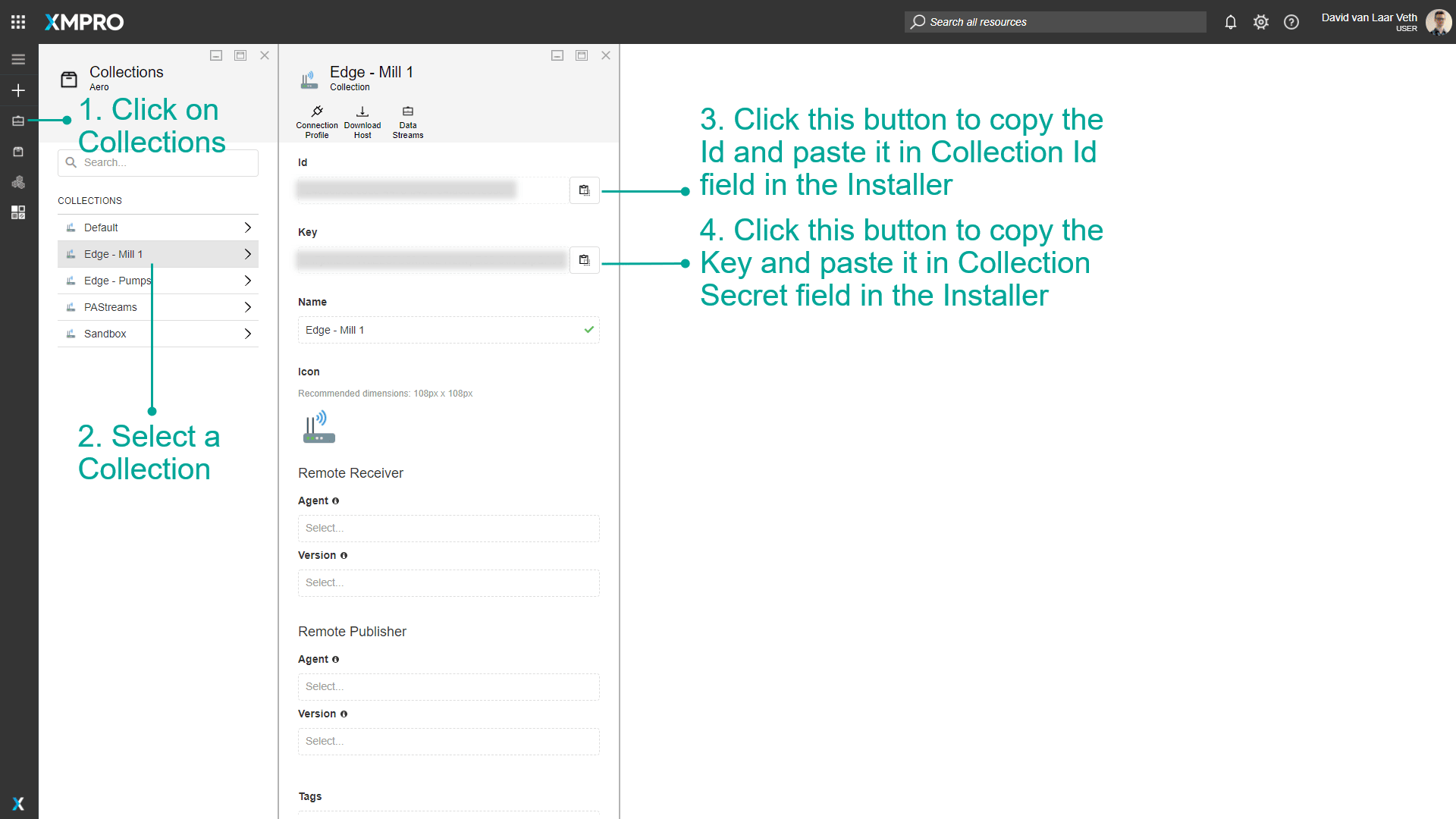
| xm__xmpro__Gateway__CollectionId | The ID of your Collection. This can be retrieved from a Data Stream Designer "Collection" |
| xm__xmpro__Gateway__Name | The name that appears in Data Stream Designer when viewing Online Hosts. E.g. "SH1-Device1-Docker" or "SH2-Device2-Winx64". |
| xm__xmpro__Gateway__Secret | The secret key of your Collection. This can be retrieved from a Data Stream Designer "Collection" |
| xm__xmpro__Gateway__ServerUrl | The server url for where Data Stream Designer is hosted. E.g. "https://mysampleserver/datastreamdesigner/". Please note that this URL needs to end in a forward slash. |
| xm__xmpro__Gateway__Rank | An integer, by default is "0". See Stream Host Rank for further details. |
These settings can be found in Data Stream Designer:
Repository
Below is the XMPro Docker Stream Host repository.
xmpro.azurecr.io/stream-host
Images
Image Tags
All images are tagged with the release version number, starting from 4.4.2. For example, use a version tag to reference the Stream Host for v4.4.2:
xmpro.azurecr.io/stream-host:4.4.2
The latest tag identifies the most recent XMPro Platform release version number, for example:
xmpro.azurecr.io/stream-host:latest
Warning
Using the latest tag stores a copy of the image on your system. This cached version may not be the latest release if a newer release has since been published.
We recommend specifying the specific version or re-pulling the image if a newer release has occurred since your last Stream Host docker install.
Image Flavors
A Stream Host running a Data Stream must provide the capabilities to run each Agents in the Data Stream. Choose your image depending on the capabilities that are required.
| Image Name | Description |
|---|---|
xmpro.azurecr.io/stream-host:[tag] |
A lightweight Debian option capable of running most Agents. Available from v4.4.5. |
xmpro.azurecr.io/stream-host-alpine:[tag] |
A lightweight Alpine option capable of running most Agents. Available from v4.4.3. |
xmprocontrib.azurecr.io/sh-ubuntu-python-nvidia:latest |
Ubuntu, Required when using the Python Agent for CPU-only processing. |
xmprocontrib.azurecr.io/sh-alpine-python:latest |
Alpine, Required when using the Python Agent for CPU-only processing. |
Creating a Custom Image
You may need a Stream Host that has capabilities that differ from the available image flavors such as additional Python modules (e.g. via pip).
Add additional Python modules
The docker image can be used to create a custom stream-host with additional Python modules installed. Use xmprocontrib.azurecr.io/sh-alpine-python:latest as the base image for python workloads.
Example requirements.txt file
numpy
Example docker file
FROM xmprocontrib.azurecr.io/sh-alpine-python:latest

COPY requirements.txt /app/requirements.txt
RUN pip install -r /app/requirements.txt
Package Installation via Environment variables
In addition to creating a custom image, the Stream Host Docker image now supports installing additional Python APKs and packages dynamically at runtime using environment variables. This allows for more flexibility without modifying the base image.
You can install packages in the following ways:
- SHS_PIP_MODULES: Specifies Python packages to be installed via pip at container startup. Multiple packages can be listed with spaces as separators. If not specified, no additional pip modules will be installed.
- PIP_REQUIREMENTS_PATH: Points to the location of a requirements.txt file inside the container. This file contains a list of Python packages to be installed via pip. If not specified, the default path is /app.
- ADDITIONAL_INSTALLS: Lists APK or APT packages to be installed before any Python packages. These are typically system dependencies required by certain Python packages. If not specified, no additional system packages will be installed.
Example Docker compose
services:
  sh:
    image: xmprononprod.azurecr.io/stream-host:4.4.18-alpine3.21-python3.12
    environment:
      - xm__xmpro__gateway__id=$SH_ID
      - xm__xmpro__gateway__name=$SH_NAME
      - xm__xmpro__gateway__serverurl=$DS_BASEURL_SERVER
      - xm__xmpro__gateway__collectionid=$SH_COLLECTIONID
      - xm__xmpro__gateway__secret=$SH_SECRET
      - SHS_PIP_MODULES=pandas scikit-learn numpy
      - PIP_REQUIREMENTS_PATH=/app
      - ADDITIONAL_INSTALLS=build-base gcc g++ libgcc libstdc++ musl-dev python3-dev openblas-dev freetype-dev libpng-dev py3-pip
    restart: unless-stopped
    volumes:
      - ./requirements.txt:/app/requirements.txt
Run Examples
Please see the following examples to run Stream Host as a Container:
Docker Run
Create an "envfile" containing the following (replacing <values> with the actual Configuration Settings)
xm__xmpro__Gateway__Id=<Unique ID>
xm__xmpro__Gateway__CollectionId=<Collection ID>
xm__xmpro__Gateway__Name=<Device Name>
xm__xmpro__Gateway__Secret=<Collection Secret>
xm__xmpro__Gateway__ServerUrl=<Server URL>
xm__xmpro__Gateway__Rank=<Rank>
Start
Run the Stream Host using the following command. Specify the version or add "--pull always" to ensure you're using the newest release.
docker run --env-file=envfile --name stream-host xmpro.azurecr.io/stream-host:latest
Stop
Stop the Stream Host using the following command.
docker rm -f stream-host
Docker Compose
Create a file called compose.yaml in your working directory and paste the following (replacing <values> with the actual Configuration Settings):
services:
  stream-host:
    image: xmpro.azurecr.io/stream-host:latest
    pull_policy: always # specify to always use the latest release version
    container_name: 'stream-host'
    environment:
        - xm__xmpro__Gateway__Id=<Unique ID>
        - xm__xmpro__Gateway__CollectionId=<Collection ID>
        - xm__xmpro__Gateway__Name=<Device Name>
        - xm__xmpro__Gateway__Secret=<Collection Secret>
        - xm__xmpro__Gateway__ServerUrl=<Server URL>
        - xm__xmpro__Gateway__Rank=<Rank>
    restart: on-failure
Note
See Docker Compose Overview for further details on how to use Docker Compose.
Start
In the same working directory ascompose.yaml, run the following command to start the Stream Host.
docker-compose up -d stream-host
Stop
In the same working directory ascompose.yaml, run the following command to stop the Stream Host.
docker-compose down
Next Step: Agents & Connectors
The stream host installation is complete. Please click below to install the default Agents & Connectors:
Last modified: May 01, 2026